

Custom Software & Business Systems
Software built around your business.
When standard tools fall short, we build software for the work your team needs to manage—from customers and orders to inventory and reporting.
When We Can Help
Your team should not have to work around the software.
We review the gaps in your current tools and assess whether a custom build is the right way to solve them.
- Match the way you work. Address missing steps, unnecessary fields, and business rules that standard tools cannot fit.
- Connect scattered tasks. Help the team follow work across messages, files, and existing tools.
- Prepare for real use. Test everyday tasks, unusual situations, permissions, and human approvals.
A Practical First Step
Start with one clear need.
You do not need to commit to a larger project to begin. Choose a focused starting point, then decide what comes next.
One-time starter
Software Discovery
From $1,000
Define a focused system scope before committing to a build. Discovery fees are credited toward the build when you proceed with the build.
What you get
- Requirements for one focused business system
- An outline of the key workflow, screens, and user roles
- Written recommendations, a proposed build scope, and one walkthrough
Keep in mind
- One focused system based on your current process and tools
- A working prototype, software build, integrations, and ongoing support are not included
Every project receives a custom quote, including work that fits a starter. Starting prices and broader ranges are guides; the quote sets the exact scope and fee.
Planning-only work includes written recommendations and one walkthrough. Hands-on team training belongs to implementation work and is scoped to the project.
Have a larger project in mind? See broader pricingWhat LaunchWorks Does
Build the tools your team needs to get the job done.
- Understand the task and users; plan screens, business rules, access, and review steps
- Build customer, quote, order, purchasing, inventory, delivery, document, or reporting tools
- Test everyday work and unusual situations
- Train the team and provide instructions, a handoff, and any agreed ongoing support plan
See What You Could Receive
A software task and acceptance checklist
Define what people need to do before deciding which screens or features to build.
| User task | Expected behavior | Test status |
|---|---|---|
| Create an order | Required details are checked | To test |
| Find stock information | The right records are shown | To test |
| Use the correct access | Permissions match the person’s role | To test |
Working Together
Agree. Build. Put it to work.
- Agree on the work, total fee, responsibilities, and timing.
- Review or implement the agreed scope, with the right walkthrough or training.
- Hand off with clear instructions and any ongoing help you choose.
Planning-only work includes written recommendations and one walkthrough. Hands-on team training belongs to implementation work and is scoped to the project.
See the full processFrom Our Portfolio
IDG Desktop Manager, built for IslandWide.
LaunchWorks developed IDG Desktop Manager around IslandWide's customer, quote, order, purchasing, inventory, delivery, document, and reporting workflows. Explore the project and its dashboard in our portfolio.
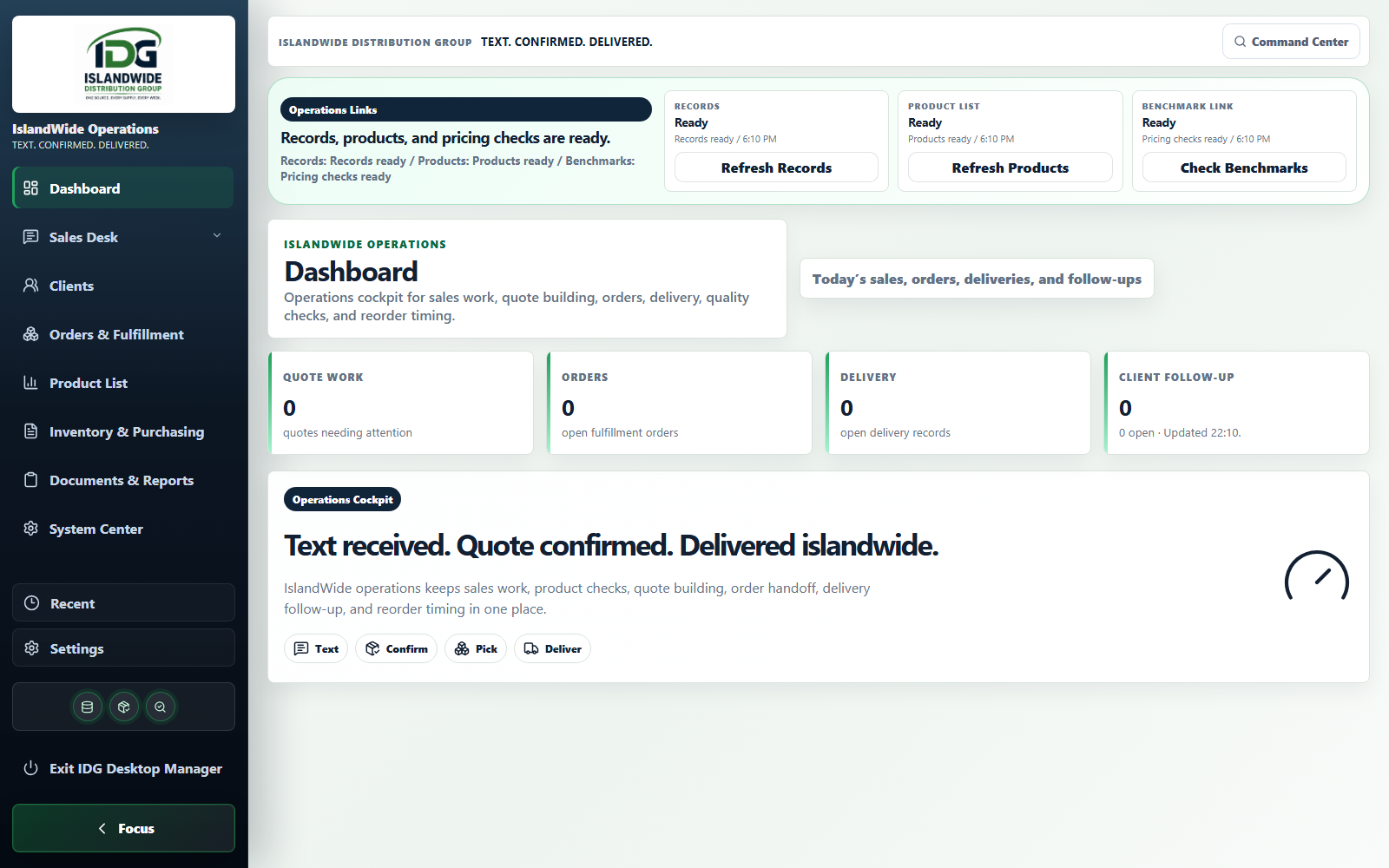
The dashboard built for IslandWide’s customer, order, product, and inventory work. The screenshot uses example counts and displays no client information.
Explore the projectFor a Larger Project
Plan the next stage.
Start with the work you need now. These ranges help you consider a broader project or ongoing support when it is useful.
Illustration only, not a package or quote: a $10,000 eligible quoted implementation fee minus a $1,000 bundle saving, then minus $1,000 in related planning already paid, leaves $8,000 remaining. Total paid, including that earlier planning payment, is $9,000.
What shapes the price?
A focused project with ready-to-use information may sit nearer the lower end. More moving parts or work to prepare usually means a larger scope. We look at:
- The number of workflows, screens, and user roles
- Connections to existing tools and the condition of data being brought over
- The business rules, testing, training, and support required
These ranges are planning guides, not a quote. Your proposal explains which work or phases apply and the total price; do not add the ranges together to estimate a package. Ongoing services and third-party costs are agreed separately.
Software & Systems FAQ
Questions before a custom build.
Before building, we agree on the features, fee, timing, access, integrations, hosting, ownership, and support. Each project has its own requirements, so we assess the work before promising a particular connection or delivery date.
When is custom software a better fit than an existing product?
It may be appropriate when standard tools do not fit the business's required steps. The decision should follow a review of the actual workflow and available options.
Can LaunchWorks train our team?
Yes. Hands-on training and written instructions are scoped to the software implementation. Planning-only Discovery includes written recommendations and one walkthrough.
Does maintenance continue after launch?
We can arrange ongoing updates and support. The work, response arrangements, and cost are agreed before support begins.
Will the software connect to our existing systems?
We first check what those systems allow and what access is available, then recommend suitable connections.
Who owns the software and source code?
Ownership, licensing, source-code access, and handoff are set out in your agreement before the build begins.